
Run orders for your CAD center
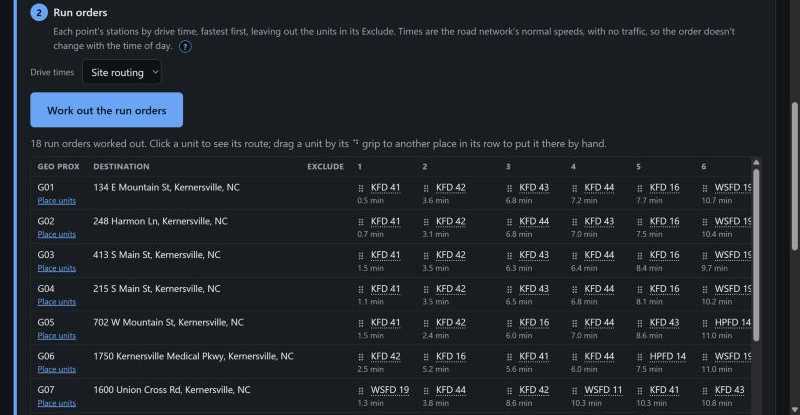
A CAD center needs, for every geoprox area, the units to send in order, with nothing else in the way. GP Run Times produces that list for every area at once and downloads it in the layout your center already uses.
What a dispatch center needs
One row per area: the area's code, its destination address, the units left out of that area, and then the units in order, first due to last. The order has to hold up: a unit excluded from an area never appears in its row, a unit placed by hand for a reason stays where it was placed, and the names are the ones the CAD knows. GP Run Times keeps all three. The Exclude list is applied per area, placements are kept with the area they belong to, and where your station list names a unit differently from your run orders, the run orders' name is the one used.
The download, in your own layout
Download the run orders gives a workbook. Its Run Orders sheet is laid out like the one you uploaded, so the center sees what it expects. A Stations sheet lists the stations with where each was found. A Drive Times sheet holds the minutes and miles behind every rank, so when someone asks why a unit is third, the number is there. Units placed by hand are marked on the sheet, and a unit whose data changed since it was placed says so.
Keeping it current
A department dispatched by more than one center keeps a run order list for each. When a station moves or a unit changes, work the list out again; placements carry over to the same areas. Publish the list to your own crews so everyone reads the same run order, and run the download again for the center. Nothing in the download depends on the time of day, because the drive times are at posted speeds with no traffic.
See how a geoprox area and its center point are set up, and the run card that comes out of it.
Start a 10-day free trial No card needed. · Pricing · How it works